Ground Protection
Always-on monitoring for severe ground weather where your aircraft is parked — at home, away on a trip stay, or temporarily based somewhere else. Get text alerts when threats appear, text PlaneWX back to update hangar/ramp status or pull a weather snapshot, and see a morning digest summary with your other daily weather.
Pro Plus and Enterprise feature
Ground Protection (always-on watch, SMS alerts, and the morning-digest block) requires Pro Plus or Enterprise. The related trip briefing card — While You're There — remains available on Pro and above for destination stays during a trip.
Ground Protection vs. While You're There
Both use the same weather engine — same data products, same advisory logic, same aircraft wind/cold thresholds. They answer the same underlying question: is my parked airplane safe on the ground? They differ in when they run and how they reach you.
| While You're There | Ground Protection | |
|---|---|---|
| Where you see it | Inside a trip briefing | Aircraft settings, SMS, morning digest |
| When it runs | While you have a trip stay at a destination | Always-on for enabled tails (home / parked / standby) |
| Typical window | Until your next leg departs (or ~3 days if unknown) | Rolling ~72-hour watch at the aircraft's watch airport |
| Plan | Pro and above | Pro Plus and above |
PlaneWX evaluates trip stays first. If a tail already has an active trip stay covering it, that path owns the hazard watch for that airport so you aren't double-alerted for the same threat.
Why This Exists
Most weather tools stop caring once you land. PlaneWX keeps watching the ramp — hail, tornado risk, damaging wind, freezing rain, hard freezes, and extreme heat — so you know when the airplane needs a hangar, better tie-downs, or a preheat. Ground Protection is that watch when you're not staring at a briefing: overnight at home base, parked away for a few days, or based temporarily at another field.
Like While You're There, Ground Protection is informational. It never changes your WX Score, fly / don't-fly status, or any flight scoring category. It only answers: will my plane be OK sitting on the ground?
How to Turn It On
- Open Profile → Aircraft and edit the tail you want watched.
- Under Ground & Automation, turn on Monitor ground weather for this aircraft.
- Set a Home airport (where the plane lives when not temporarily parked elsewhere) and Home storage (ramp, tie-downs, shade, hangar, etc.).
- Optionally set Currently parked at if the airplane is away from home for a while — airport, until-date, and storage there.
- Set Max Ground Operations Wind and Minimum Operating Temperature from your POH when you know them (see thresholds below).
- For texts: add a phone number on the Pilot tab, then opt into ground-weather SMS under Notifications (or accept texts when the activation dialog appears).
Pro Plus can watch up to 3 aircraft at once (Enterprise is unlimited). You can still keep more tails in your fleet — only the ones with monitoring on count toward the cap.
When monitoring first turns on with SMS enabled, PlaneWX can send a one-time confirmation text so you know the watch is live and which airport/storage it's using.
Which Airport Is Being Watched?
PlaneWX picks one watch location per aircraft, in this order:
Currently parked at overrides everything until the optional until-date expires (or you clear it / text HOME). Use this when the plane is away from home for days or weeks.
The aircraft's Home airport field (standby / home base for this tail), with your home storage type.
If the aircraft home airport is blank, PlaneWX falls back to your pilot-profile home airport.
U.S. airports only for now — NWS and SPC products don't cover international fields the same way. FAA LID codes (like 66TE) and ICAO codes both work.
Storage Types (How Protected Is the Airplane?)
Storage tells PlaneWX what threats are already mitigated so texts and UI can stay quieter when you're truly secured. It never affects flight scoring.
Open ramp
Not secured. No categories suppressed — you get the full set of Urgent/Alert texts that apply.
Ramp with tie-downs
Better than open ramp for wind, but PlaneWX still texts Urgent/Alert threats — tie-downs don't stop hail or a tornado warning.
Shade hangar (+ tie-downs)
Suppresses heat advisories (shade is the main heat mitigation). Wind/hail/storm alerts still matter.
Hangar
Suppresses wind, convective, and regional categories for SMS/visual demotion. Cold and heat can still matter (unheated / poorly ventilated hangars).
Climate-controlled hangar
Suppresses wind, convective, regional, cold, and heat — the fullest mitigation PlaneWX models.
You can change storage in the app anytime — or by texting HANGAR / RAMP after an alert (see SMS menu below).
How Monitoring Works
- An hourly job re-evaluates every Ground Protection–enabled aircraft (and active trip stays) against fresh NWS/SPC/model data.
- Always-on watches use a rolling ~72-hour forecast window from “now.”
- Results are stored on the aircraft as a Ground Protection snapshot (airport, storage, advisories, day forecasts, last evaluated time).
- SMS fires only for new Urgent or Alert advisories you haven't already been told about — not every Advisory/Info item, and not the same headline every hour.
- Quiet hours (default roughly 10pm–7am local, configurable under Notifications) hold alert texts until quiet hours end. The threat isn't forgotten — it still sends when the window opens if it's still new.
Products PlaneWX Ingests & Analyzes
Ground Protection uses the same public government and research products as While You're There — no black-box commercial weather API for this feature.
1. NWS Point Forecast (api.weather.gov)
Official National Weather Service forecast periods for the exact airport coordinates. PlaneWX groups them into calendar days and extracts:
- Daytime highs / overnight lows (°F)
- Precipitation probability
- Sustained wind and gusts (knots)
- Short forecast text (used for freezing rain, snow, etc.)
Wind advisories use gusts when NWS reports them (POH ground limits are gust limits); otherwise sustained wind. Detailed day-by-day coverage is capped at about 7 days — the practical NWS horizon.
2. NWS Active Alerts
Live watches and warnings overlapping the watch window, filtered to events that matter for a parked aircraft:
- Tornado Warning / Watch
- Severe Thunderstorm Warning / Watch
- High Wind Warning / Watch, Wind Advisory
- Extreme Wind Warning
- Dust Storm / Blowing Dust Warning and Dust Advisories
- Ice Storm Warning
- Winter Storm Warning / Watch, Winter Weather Advisory
- Blizzard Warning, Snow Squall, Lake Effect Snow
- Freezing Rain / Dense Fog / Freezing Fog Advisories
- Flood Watch / Warning / Advisory
- Flash Flood Warning / Watch / Statement
- Hurricane / Typhoon / Tropical Storm Warning & Watch
- Storm Surge Warning / Watch
- Ashfall Warning / Advisory, Dense Smoke Advisory
- Extreme Cold Warning / Watch, Cold Weather Advisory
- Extreme Heat Warning / Watch, Heat Advisory
Events matching tornado, severe thunderstorm warning, ice storm, hurricane warning, or extreme wind are treated as Urgent when they are on the legacy SMS list; other hangar-relevant alerts that text today stay Alert. Newly added display events (for example Flood Watch) appear in the briefing card as advisories and do not send SMS or push on their own. Coastal Flood and Lakeshore Flood products are not included.
3. SPC Probabilistic Outlooks (Days 1–3)
NOAA Storm Prediction Center tornado, hail, and damaging-wind probabilities at the airport point. Day numbering is anchored to today (issuance), so a threat two days from now is checked against SPC Day 3, not Day 1.
- Tornado ≥ 5% → Alert (hangar strongly recommended)
- Hail ≥ 15% → Alert (tie-downs don't help hail)
- Damaging wind ≥ 15% → Alert (gust fronts)
- Categorical Slight/Enhanced/Moderate/High with lower severe probs → Advisory (thunderstorms possible)
4. GFS & ECMWF (via Open-Meteo)
Independent global models used two ways:
- Precip consensus — cross-checks NWS rain chance. Wide disagreement is flagged with a ± so you know that percentage is less certain (common for thunderstorm setups 3+ days out).
- Model preview days — when NWS hasn't issued a forecast yet for the far end of the window, PlaneWX fills those days with a clearly labeled lower-confidence GFS/ECMWF blend instead of leaving a blank gap.
- Sunrise / sunset — astronomical times for each day (helpful for preheat and early departures). Informational only; never triggers an advisory.
What Triggers an Advisory
Severities are Urgent, Alert, Advisory, and Info. Text alerts send for new Urgent and Alert items only.
Convective
Tornado/severe thunderstorm watches & warnings, plus SPC tornado/hail/wind thresholds above.
Wind
Forecast wind/gusts at or above your aircraft advisory or critical ground-wind threshold; High Wind / Extreme Wind NWS products.
Regional
Hurricane/tropical, ice storm, blizzard, flash flood, dust storm, extreme heat warning, and similar field-threatening NWS products.
Cold
Overnight lows ≤ preheat threshold (default 32°F); below POH min operating temp (Alert); freezing rain (Urgent); snow with ≥40% PoP (Advisory).
Heat
Highs ≥ 95°F (Advisory) and ≥ 105°F (Alert). Shade — hangar or sunshades — is the primary mitigation; avoid topping off fuel on a hot ramp.
Aircraft-Specific Thresholds
PlaneWX classifies the aircraft (light sport, single, twin, turboprop) from its type string and applies class defaults. Two Aircraft Profile fields override those defaults when set:
Max Ground Operations Wind (kt)
Your Max Ground Operations Wind, when set. Sets the critical wind threshold; the advisory threshold sits a few knots below it. Suggested values are not used here.
Minimum Operating Temperature (°F)
POH “do not operate below.” Overnight lows that cross it become an Alert (heated hangar strongly recommended), not just a preheat Advisory.
Example class defaults if you haven't set POH values: light sport ~25/35 kt advisory/critical; turboprop ~40/50 kt. See Aircraft Profiles.
Text Messages — The Full Menu
Ground Protection is designed to work from your phone. Reply to any Ground Protection text — or text the PlaneWX ground number from the phone on your account — using the keywords below. Commands are case-insensitive; only the first word matters.
Requirements for texts
- Phone number saved on your Pilot profile
- Ground-weather SMS opted in (Notifications, or activation dialog)
- At least one aircraft with Ground Protection enabled
- Pro Plus (or Enterprise) subscription
Outbound texts you may receive
Activation / confirmation
Sent when you turn monitoring on with texts enabled. Confirms the tail, airport, and storage, and reminds you that Urgent/Alert threats text outside quiet hours.
PlaneWX: Ground Protection is on for N12345 at 66TE (open ramp).
You'll get texts for new Urgent/Alert threats outside quiet hours.
Reply HANGAR if secured · RAMP if on ramp · HOME if back at base · STOP · HELP
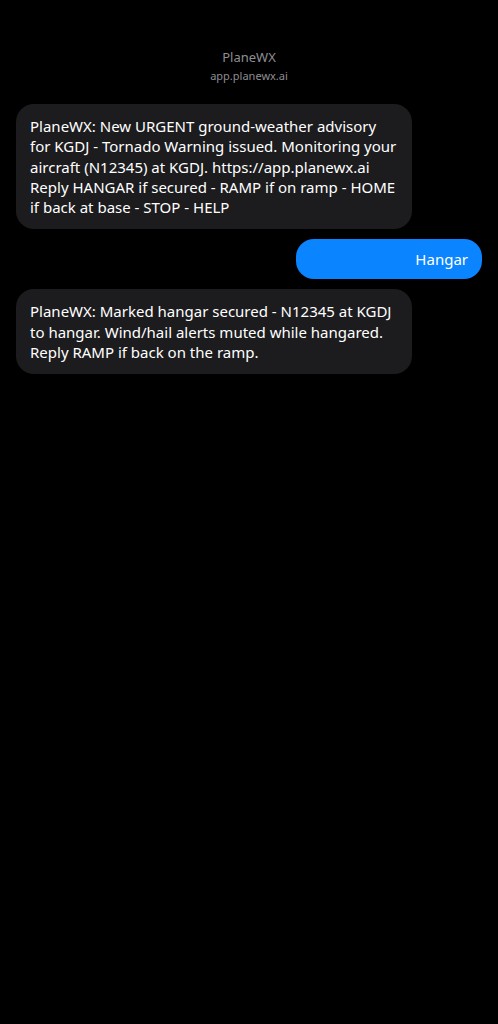
New threat alert
When a new Urgent or Alert advisory appears for your watch airport (or an active trip stay). Multiple new advisories in one hourly run are combined into a single text.
PlaneWX: New ALERT ground-weather advisory for 66TE - High wind above aircraft limit.
Monitoring your aircraft (N12345) at 66TE. https://app.planewx.ai
Reply HANGAR if secured · RAMP if on ramp · HOME if back at base · STOP · HELP
Commands you can text anytime
Every alert ends with a footer advertising these replies. You can also text them proactively.
WX (also WEATHER or FORECAST)
On-demand weather snapshot for the airport PlaneWX is watching. Ignores quiet hours — you asked, so you get it immediately. Uses a fresh evaluation if the cached snapshot is older than about two hours.
Includes up to three forecast days (high/low, rain %, wind as sustainedGgust kt) plus the top advisory if any. If you recently got a trip-stay alert, WX prefers that destination so you're looking at the same airport you were just notified about.
PlaneWX N12345 @ 66TE (hangar):
Thu 78F/55F 20%rain 12G22kt
Fri 82F/60F 15kt
Sat 90F 8kt
ALERT: Strong surface winds expected...
STATUS (also WATCH)
Lists every Ground Protection–enabled aircraft: airport being watched, storage type, and whether the source is parked / home.
PlaneWX watching: N12345 at 66TE (open ramp, parked)
HANGAR (also HANGARED or SECURED)
Marks storage as hangar for the current watch — either the always-on aircraft location, or the trip stay you were most recently texted about (within about 72 hours). Use this after you actually get the airplane under a roof so future alerts can quiet down for threats a hangar solves.
PlaneWX: Marked hangar secured - N12345 at KGDJ -> hangar. Wind/hail alerts muted while hangared. Reply RAMP if back on the ramp.
RAMP (also OPEN, UNHANGAR, or UNSECURED)
Marks storage as open ramp again. Use when you leave the hangar or the plane is back exposed.
HOME (also HOMEBASE or BASE)
Clears the temporary “currently parked at” override and resumes watching the home / standby airport. Does not change your default home storage type.
HELP (also INFO or ?)
Short reminder of every command:
PlaneWX: Pre-Flight Text, Ground Protection & Mentor texts. Cmds: WX STATUS HANGAR RAMP HOME FOB. STOP ends all. Msg&data rates may apply. hello@planewx.ai
STOP (also STOPALL, UNSUBSCRIBE, CANCEL, END, QUIT, REVOKE, OPTOUT)
Blocks all PlaneWX texts. Ground Protection, Pre-Flight Text and Mentor texts all share the same number. Monitoring can still evaluate in the app; you just won't get texts until you opt back in.
START (also UNSTOP)
Lets texts reach this number again after a STOP. PlaneWX turns back on the text programs you had on before you sent STOP, as long as that STOP was in the last 90 days. Otherwise, turn each program back on in Settings. You still need Ground Protection enabled and a phone on file for ground alerts.
Tip: After an alert about a trip destination, HANGAR / RAMP apply to that trip stay for about 72 hours. Outside that window (or for always-on watches), they update the aircraft's parked/home storage instead. Text STATUS anytime you're unsure what PlaneWX thinks it's watching.
Morning Digest
If you receive the consolidated morning email, Pro Plus users with Ground Protection enabled get a compact Ground Protection block after home-airport weather. It pulls from the cached hourly snapshot (no extra live fetch in the email job):
- Tail and watch airport, storage, texts on/off
- Today and tomorrow high/low, wind, rain chance
- Top Alert/Urgent advisory headline when present
- Subject line may include Ground alert when a severe advisory is active
This is separate from Follow Me (Pro and above), which can swap your pilot home-airport weather to the last ADS-B landing field. Ground Protection is about the aircraft hazard watch, even when those airports sometimes match.
Important Limitations
- •Never affects your WX Score. Ground risk only — not a fly / don't-fly for flying.
- •U.S. airports only (NWS / SPC coverage).
- •You must keep watch location and storage accurate (app or
HOME/HANGAR/RAMP). PlaneWX does not yet auto-move the watch from ADS-B landings. - •Always confirm hangar space with the FBO — PlaneWX tells you when to start calling, not that a hangar is reserved.
- •Hourly evaluation is not a second-by-second radar product. Fast-moving cells can still develop between runs — use texts as an early cue, not a substitute for looking outside.
Ideas to make this better? Use the Feedback button in the app — we read every submission.