Mentor System
Get advice from experienced pilots - or volunteer your expertise to help others make safer fly / don't-fly decisions.
How It Works
Unlike generic aviation forums, PlaneWX mentors see your exact briefing - the same WX Score, weather analysis, aircraft profile, and personal minimums you see. This shared context means the conversation starts with real data, not verbal descriptions over the phone.
After a mentor accepts your request, the actual conversation happens off-platform via phone, text, or WhatsApp - tools pilots already use.
Standing Mentors - a person you choose, on a cadence - is coming soon. How that will work.
Getting Help (Mentees)
Requesting a Mentor
From any briefing page, tap the Mentor button in the header. You'll see two options:
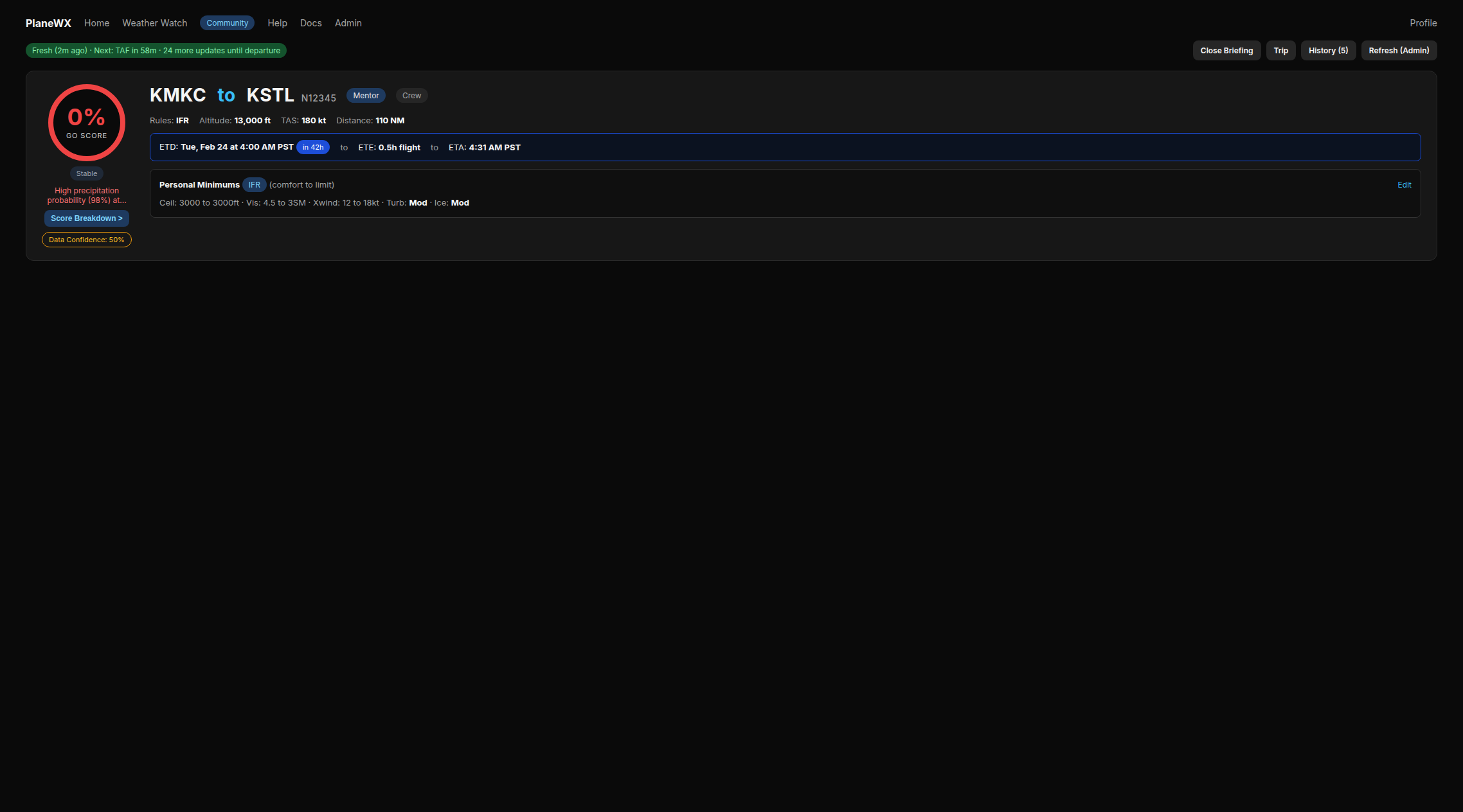
Need Help Now
Sends a request to available mentors, starting with the most experienced. The first mentor to accept sees your briefing and reaches out. Best for urgent situations - you'll typically hear back within a few minutes if mentors are available. When it comes to weather advice, talking to any experienced pilot is better than going it alone.
Available to all users. Only unlocks within 2 hours of your departure time (or up to 2 hours after, for delays). Also requires a FRAT when within the 4-hour FRAT window, so mentors have your full situational picture beyond just the weather.
Browse Mentors
Browse a directory of all mentors sorted by relevance - mentors who fly your aircraft type appear first with a highlighted badge. Filter by specialty and rating, then send a direct request. They have 48 hours to accept or decline. Free users cannot browse; Browse Mentors requires Pro. Free users can still use Need Help Now (broadcast).
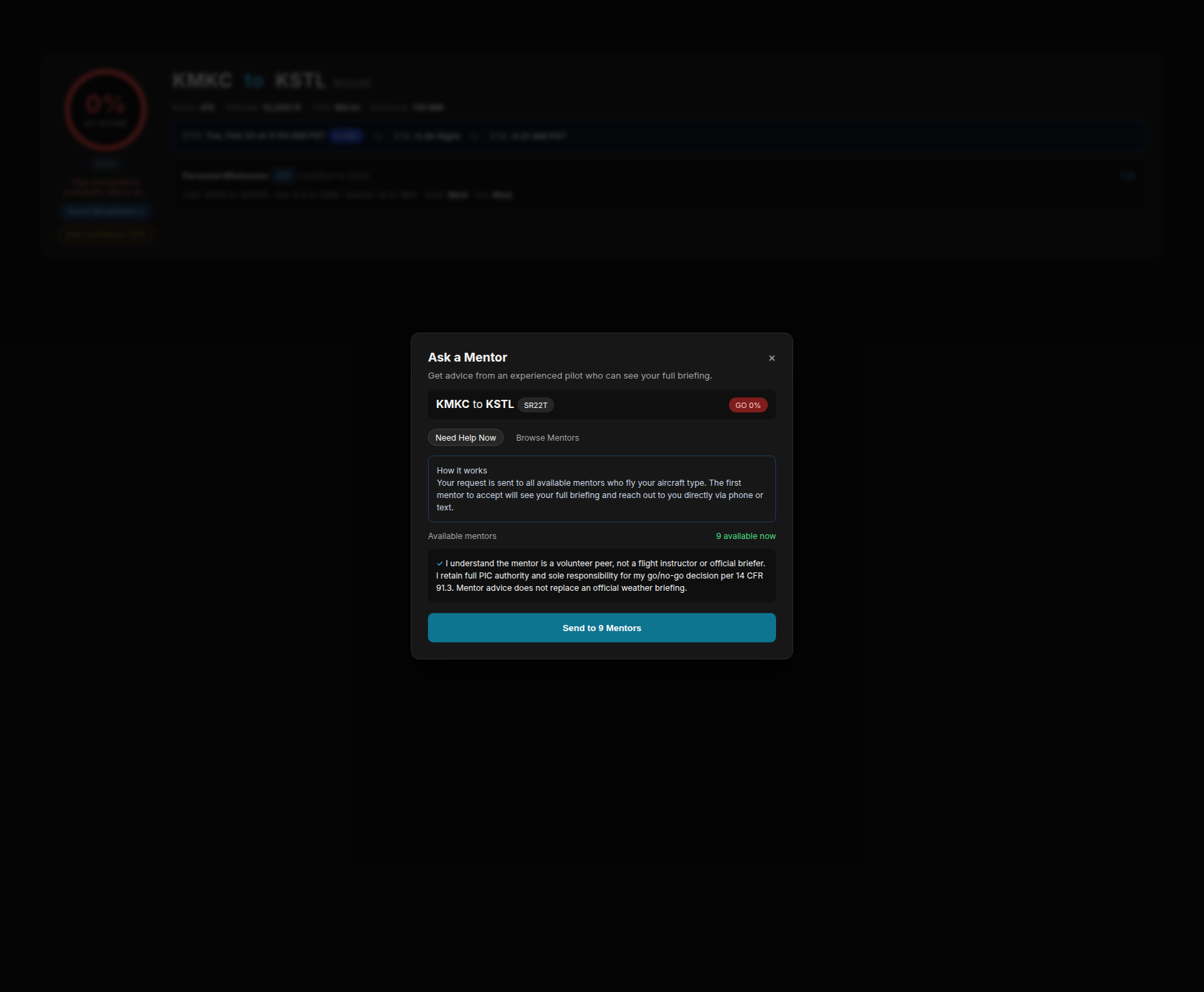
Limit a Request to Your Group
If you belong to any PlaneWX group - a community club, airport, aircraft, or event group - the Ask a Mentor dialog includes an optional filter: All mentors or a specific group. Use it when you want advice from mentors inside your org or club first.
- •Applies to both Need Help Now and Browse Mentors.
- •Mentors must still be enrolled as PlaneWX mentors and be members of that group.
- •If a scoped urgent request finds no mentors, PlaneWX will not silently fan out to the global pool. Switch back to All mentors and send again.
Creating clubs and inviting mentors is covered in the Community Groups guide.
Eligibility
To protect mentors from abuse and ensure quality interactions, you must meet these requirements before requesting a mentor:
- •Account age - your account must be at least 21 days old
- •Briefing history - you must have generated at least 5 briefings
- •Phone number - required in your profile so the mentor can contact you
- •PIC acknowledgment - confirming the mentor is a volunteer peer, not a flight instructor
- •For Need Help Now, a completed FRAT (required when within 4 hours of departure)
- •For Need Help Now, being within 2 hours of your departure time - requests are only accepted within this window (up to 2 hours after ETD for delays)
Pro subscribers bypass the account age and briefing history requirements.
Tips for a Successful Session
Mentors are volunteers who donate their time and expertise. Come prepared to make the most of your conversation:
- •Review your briefing first - Know your WX Score and what's driving it. Don't ask a mentor to read the briefing to you.
- •Prepare specific questions - "What do you think about the crosswind at my destination?" is more productive than "Is it safe to fly?" Come with 2-3 focused concerns.
- •Complete your FRAT checklist - This gives the mentor a complete picture of your situation beyond just the weather.
- •Have your charts and plates ready - If your questions involve airspace, approaches, or terrain, have them pulled up before the call.
- •Be mindful of time - Aim for a focused 10-15 minute conversation. If you need more time, ask if the mentor is available.
- •Share your experience level - Let your mentor know your certificate, ratings, and recent flying experience. It helps them tailor their advice.
- •Remember: you are PIC - Mentor advice is one input in your decision. The final fly / don't-fly call is always yours.
After a Mentor Accepts
- •You'll be notified by email and SMS with the mentor's name, credentials, and phone number.
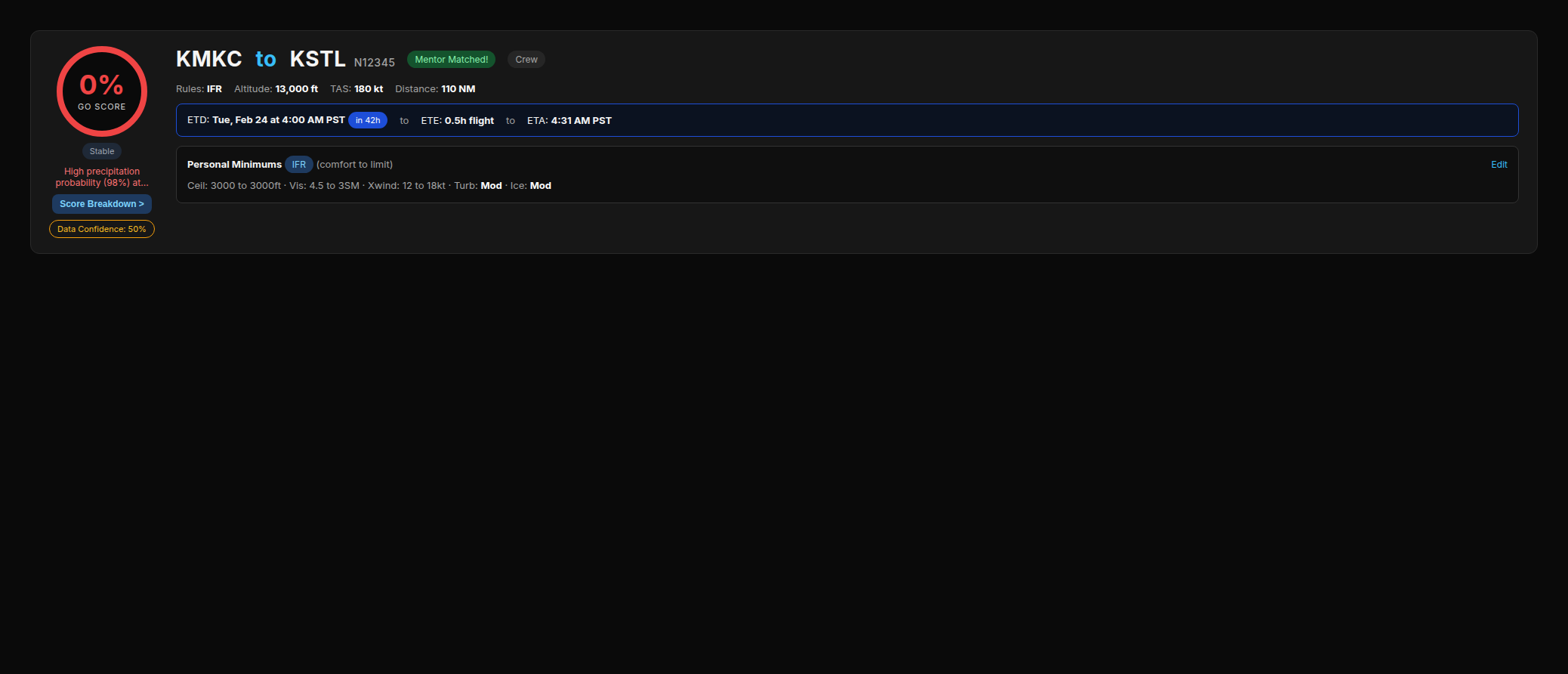
- •The Mentor button on your briefing will pulse to indicate a match.
- •Depending on the mentor's call preference, either you or the mentor will initiate the call. The notification will tell you who should call first.
- •After the conversation, either you or the mentor can mark the session complete. You'll see a rating prompt appear; if you've already rated and open the Mentor button again, you'll go straight to a new session request.
- •You'll be asked to rate the experience (1-5 stars) and optionally leave feedback for the mentor. This helps them improve and contributes to their standing in the mentor pool.
Cancelling a Request
You can cancel an open request at any time from the Mentor dialog on your briefing page. If no mentor accepts within the time limit (24 hours for broadcast, 48 hours for direct), the request expires automatically and you'll receive an email letting you know - along with a reminder that you can submit a new request anytime.
If you used Browse Mentors and your chosen mentor isn't available, you'll also receive a notification so you can try "Need Help Now" to reach the broader pool.
For Mentors
Your Role - What It Is (and Isn't)
Being a PlaneWX mentor is a one-on-one, private conversation between you and the pilot who requested help. No one else is on the call. No one else sees your exchange. It's a peer conversation - the kind experienced pilots have been having with each other since aviation began.
You are not acting as a flight instructor, dispatcher, or safety officer. You're sharing your personal experience and perspective as a fellow pilot who's been in similar situations. What you say, how much you say, and how far you're comfortable going is entirely up to you.
You are never required to tell a pilot what to do. You don't have to make the GO / NO-GO call for them. You might walk through the weather data together, talk about your own experience in similar conditions, share how you'd personally think about the decision - or simply listen and ask questions that help the pilot think it through for themselves. Any of that is valuable. Any of that is enough.
The pilot remains PIC in every sense - legally, operationally, and in terms of the final call. Your job is to make sure they're not making that decision alone.
Signing Up
Go to Profile → Mentor tab. Fill out your:
- •Display name - how you appear to pilots browsing mentors (e.g. first name, callsign)
- •Bio - your experience, what you can help with
- •Aircraft types - what you fly (mentees see you highlighted if you share their type, but all mentors are visible to all pilots - aircraft type is never a barrier)
- •Specialties - mountain flying, icing, IFR in IMC, international, etc.
- •Phone number - for pilots to contact you after you accept (never shown to pilots you haven't accepted)
You'll also need to accept the Volunteer Mentor Agreement, which clarifies that you're providing peer guidance - not flight instruction - regardless of any certificates you hold.
Availability & Notifications
You control when and how you're contacted:
- •Available days & hours - set your window (e.g. Mon-Fri, 7 AM-9 PM)
- •Timezone - all availability is based on your local time
- •Contact method - choose Text & Email (default), Text Only, or Email Only
- •Who calls first - "Mentee calls me," "I'll call the mentee," or "Either way." This is shown to the mentee after you accept.
- •Do Not Disturb - toggle to pause all requests when you're unavailable (vacation, busy period, etc.)
SMS notifications are never sent outside your availability hours. If a request comes in while you're off-hours, you'll receive an email instead so you can decide whether to respond on your own timeline.
How "Need Help Now" Notifications Work - The Wave System
When a pilot uses "Need Help Now," PlaneWX does not send a simultaneous notification to every mentor at once. We respect your time. You're a volunteer, not an on-call dispatcher. Blasting everyone with a text for every request - when often the first mentor to respond handles it - would be disruptive and disrespectful.
Instead, requests go out in scored waves:
Sent immediately to the top 5 mentors - scored by completed sessions, average rating, and availability. Mentors who are currently in their availability window are prioritized. SMS and email go out.
If no one accepts within ~5 minutes, the next 10 available mentors are notified via SMS and email.
At ~20 minutes, any remaining in-window mentors are notified by email only.
At ~40 minutes, off-hours mentors receive an email - they may be willing to help even outside their normal window.
Once any mentor accepts, all waves stop immediately. Mentors who were already notified receive a follow-up message letting them know the pilot is in good hands.
If you receive a Wave 2, 3, or 4 notification, it simply means the earlier mentors weren't available - it's not a reflection of your standing. The scoring just ensures the most experienced, highest-rated mentors get first access, which benefits pilots and keeps the system efficient for everyone.
What If Someone Already Accepted When You Open the Link?
This will happen occasionally - especially in Wave 1 where multiple mentors receive the request at the same time. You check your phone, tap the link, and by the time you've loaded the briefing, another mentor has already accepted.
When this happens, you'll see a banner at the top of the page that says: This pilot is in good hands. Another mentor accepted this request. No action needed. Thank you for being ready to help. The pilot is already talking to someone else and you don't need to take any action. You can review the briefing if you're curious about the weather situation, but you won't see the pilot's phone number and the session notes panel won't be visible to you. Those are private to the accepting mentor.
You'll also receive a brief follow-up text or email (whichever you prefer) confirming the request has been handled - so if you're checking your messages after the fact, you'll have closure without needing to open the link at all.
There's nothing to feel bad about. The system is designed so that the pilot always gets the fastest response possible, and your contribution is that you were available and willing - that matters even if another mentor got there first.
Your Mentor Dashboard
Access your dashboard at /mentor or from the link in any notification email. The dashboard shows:
- •Requests - incoming requests waiting for you to accept or decline
- •Active - sessions you've accepted (click "View Briefing" to see the pilot's full briefing)
- •History - completed sessions with ratings and feedback
Viewing a Briefing & Accepting
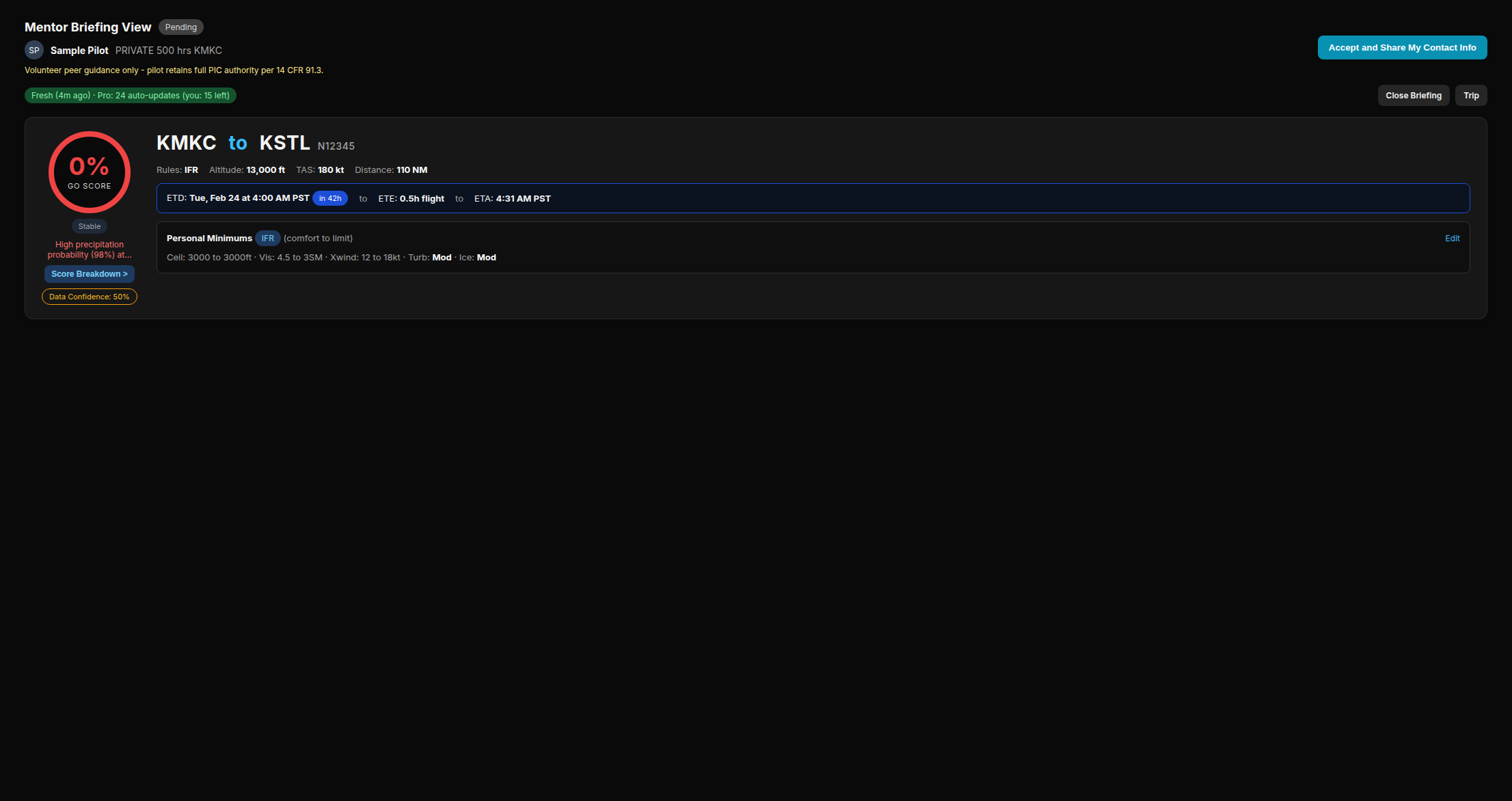
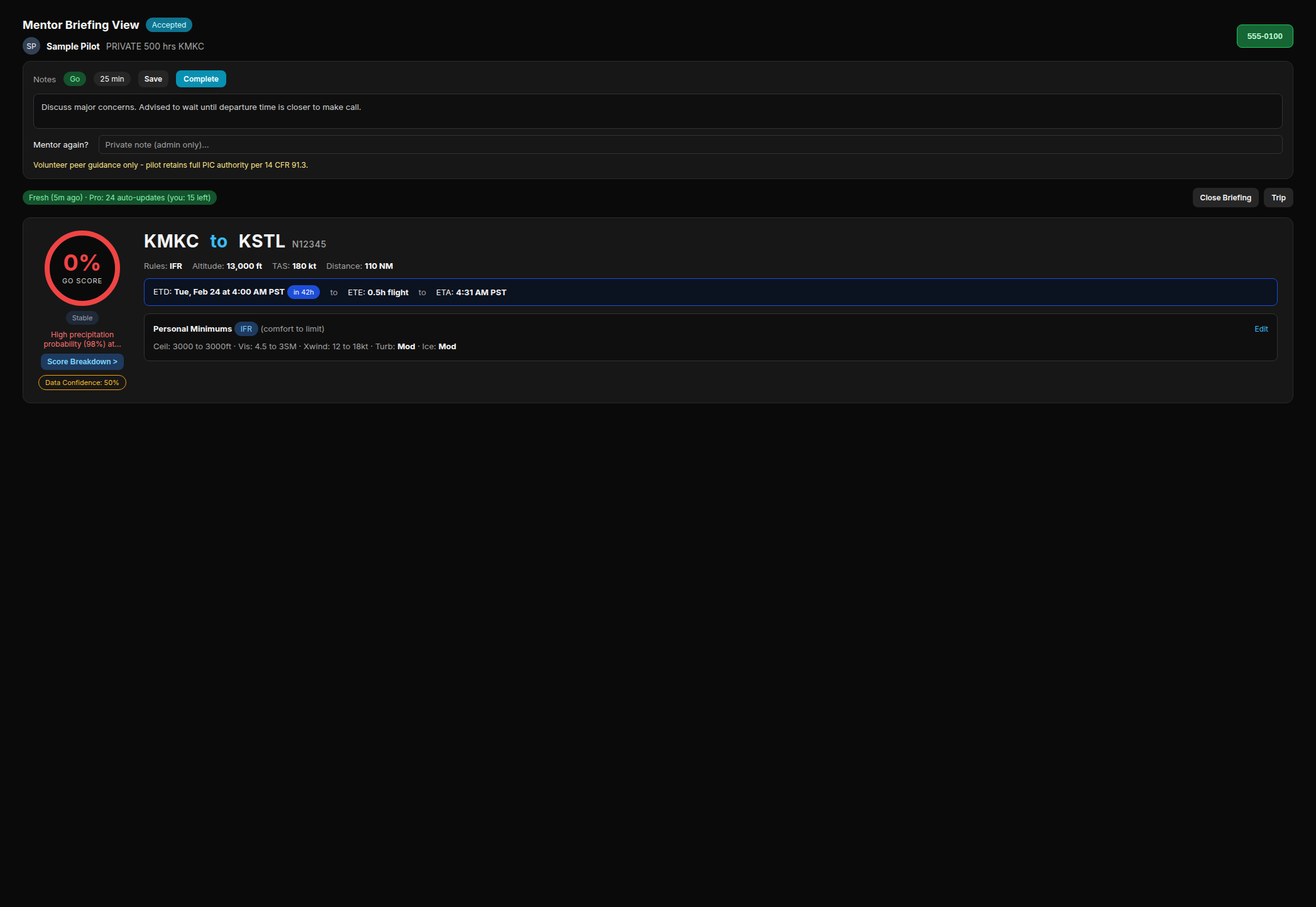
When you click the link in your notification, you'll see the pilot's exact briefing: their WX Score, weather analysis, personal minimums, aircraft profile, and FRAT if they completed one. This is the same view the pilot sees. You're walking into the conversation already briefed.
Near the top of the mentor briefing view, you can see whether the request went only to you or to a group. A direct request shows Sent only to you. A broadcast request shows Sent to N mentors (for example, Sent to 6 mentors), or Sent to several mentors when the count is unknown. If another mentor already accepted, the same Sent line is followed by . Another mentor already accepted.
A panel at the top shows the pilot's certificate, total hours, home airport, and the questions or concerns they submitted when requesting help. Review the briefing, and if you're available and comfortable helping, tap Accept.
When you accept, your phone number is shared with the pilot and the session is locked - no other mentors can accept. The pilot receives an email and SMS with your name, credentials, and contact info. Depending on your call preference, either you reach out to them or they'll reach out to you.
If you're not available or not comfortable with this particular request, you can Decline - no explanation needed. The pilot is not notified with a reason; they simply receive a message that you're not available and are encouraged to try "Need Help Now" if they haven't already.
Session Notes
After speaking with the pilot, the briefing view gives you a private notes panel to record:
- •Recommendation (GO, NO-GO, Delay, Alternate Route, Recheck Later). Optional: only record what you are comfortable with.
- •Call duration - how long you spoke
- •Notes - free-form details about the conversation, for your own records
- •Would you mentor again? - a thumbs up/down visible only to you and admins, influencing future matching
Use Save to preserve your notes without closing the session. Use Save & Completeto save everything and mark the session done in one step. If the pilot marks the session complete first, you'll see an amber banner reminding you to save before leaving - the notes panel stays editable.
All notes are private to you. The pilot never sees your notes. They're there to help you document what was discussed - for your own protection and as a record of the conversation. A snapshot of the full briefing as it was at the time you accepted is also preserved automatically.
Standing Mentors
Coming soon. Ask a Mentor on a trip is live today. Standing Mentors is the habit on top of that - not a replacement.
Ask a Mentor is the one-flight call. Standing Mentors is the quarterly check-in with your mentor - a person you choose. We never assign one. A trip session never counts as a quarterly.
You talk off-app. If you charge or pay, you settle that directly. PlaneWX is not the merchant. This is not dual given, a flight review, or an IPC. You stay PIC.
For mentees
- •Open Profile → Mentor. My Mentor will sit at the top of that tab.
- •Browse is a Pro feature. You pick one standing mentor. End the current match if you want to switch.
- •Each card shows Free, Paid (and their rate, if they wrote one), or At capacity. Write a short note: why you want a standing mentor.
- •After they accept, either of you sets a date - date only, no time. PlaneWX does not invent a first due date for a new pair.
- •If nobody sets a date in 14 days, both of you get one email. Then we stop nagging. You can still pick a date later.
- •Optional discussion points before you talk: what changed, what you flew, what stuck, what you are stepping into, minimums or FRAT, one thing you want advice on.
- •Both tap Session complete. It only counts when both have signed. You cannot unsign. You wait for the other person, or you end the match.
- •The next session is due 90 days after you both sign. Same date box. Seven days before that due date, if you still have no date, both of you get one email.
- •Either of you can end it, immediately, with no rating.
For mentors
- •On Profile → Mentor, a Standing mentees card. Off by default. Current mentors stay trip-only until you flip the switch.
- •Cap is 1-10 standing mentees (default 3). When you are full, pilots see At capacity and cannot send a request. Lowering the cap does not drop anyone you already accepted.
- •Mark yourself Free or Paid. Optional rate text. Money stays off PlaneWX.
- •Incoming requests show on My Mentor and on /mentor. You see a mentee card first - no phone until you accept.
- •Do Not Disturb pauses new standing requests too. Notes you write after a session are visible to your mentee. Standing completes do not change your trip Mentor Stats.
- •You can be a standing mentor and someone else's mentee at the same time.
Frequently Asked Questions
Is mentoring the same as flight instruction?
No. Mentors are volunteer peers sharing personal experience and opinion. Even if a mentor holds a CFI/CFII certificate, they are not acting in an instructional capacity. The requesting pilot always retains full PIC authority and responsibility for their decision.
Do I have to tell the pilot whether to go or not go?
Absolutely not. You share your perspective at whatever level you're comfortable with. You might walk through the weather data together, describe how you'd personally approach the same situation, ask questions that help the pilot think it through - or simply be a sounding board. There's no required outcome. The pilot makes the final call. Your job is just to make sure they're not making it alone.
Is the conversation private?
Yes. The session is strictly one-on-one between you and the pilot. PlaneWX does not record or monitor the phone call. Your notes stay private to you - the pilot never sees them. The pilot's phone number is only visible to you after you accept; other mentors who received the notification never see it. The conversation is yours.
What if I open the link and someone else already accepted?
You'll see a banner that says: This pilot is in good hands. Another mentor accepted this request. No action needed. Thank you for being ready to help. You can browse the briefing if you're curious about the conditions, but the notes panel and contact info won't be visible to you. You'll also receive a short follow-up message letting you know the request was handled, so you don't need to wonder if there's anything left to do.
Why didn't I get the notification right away?
"Need Help Now" requests go out in scored waves rather than blasting every mentor at once. The top five mentors by experience and rating are contacted first (Wave 1, immediate). If no one accepts within a few minutes, additional mentors are notified in subsequent waves over the following ~40 minutes. Getting a later-wave notification just means the earlier mentors weren't available - it has nothing to do with your standing. The system is designed this way to protect everyone's time.
What if I'm not comfortable with the conditions or the request?
Decline, no explanation needed. Your comfort level is the only standard that matters. If the conditions are outside your experience, if the timing doesn't work, or if you simply don't feel like you have useful input - decline. The pilot will be encouraged to submit a new request, and another mentor will have the opportunity to help. There's no pressure and no expectation that you accept every request you receive.
What if I don't fly the same aircraft type?
Aircraft type is never a blocker. Mentors who fly the same type as the pilot get priority in Browse Mentors, but for "Need Help Now," any experienced pilot's perspective is valuable. Crosswind technique, convective decision-making, alternates, and fly / don't-fly thinking aren't aircraft-specific. A Cirrus pilot can absolutely help a Cessna pilot work through a difficult weather call, and vice versa. If you're not sure you can add value, open the briefing and decide from there.
Do I need a Pro subscription to get help?
"Need Help Now" (broadcast) is available to all users who meet the eligibility requirements, including Free. "Browse Mentors" (picking a specific mentor) requires Pro; Free users see an upgrade prompt on that tab. Becoming a mentor is free for everyone. Pro subscribers also bypass the 21-day account age and 5-briefing requirements.
Can I limit a request to my club or group?
Yes. If you belong to any PlaneWX group (community club, airport, aircraft, or event), the Ask a Mentor dialog lets you optionally limit Need Help Now or Browse Mentors to mentors who are also members of that group. Mentors must still be enrolled as PlaneWX mentors. If nobody in the group is available, the urgent request will not silently expand to the global mentor pool.
Will I get texts at 2 AM?
No. SMS notifications are only sent during your availability window. Outside your hours, you'll receive an email instead. You can also enable Do Not Disturb to pause all notifications.
Can I request another mentor for the same trip?
Yes. Once a session is marked complete, you can submit a new request for the same trip if you'd like a second opinion.
Why does "Need Help Now" require a FRAT?
A FRAT gives your mentor deeper context beyond just the weather - pilot readiness, aircraft condition, environment factors, and external pressures. This naturally pairs with urgent requests where a mentor needs to understand your full decision-making picture quickly.
The FRAT prompt appears within 4 hours of departure (not earlier) because the self-assessment questions - especially fatigue and emotional state - aren't meaningful the night before. By the time you're in the "Need Help Now" window (2 hours out), your FRAT will either already be done or the briefing will prompt you to complete it first.
Can my mentor see if I took the flight?
Only if you choose. When you submit post-flight feedback, you can check "Share flight outcome with your mentor." If selected, they'll receive a brief email saying whether you flew or cancelled - nothing else.
Are there limits on how many requests I can make?
Yes. Free users can have up to 2 active requests at a time, and Pro users can have up to 5. There's also a limit of 5 requests per hour and a short cooldown after cancelling a request. These limits protect mentors from excessive notifications.
Why does it say I need to wait 21 days?
To protect mentors, new free-tier accounts must be at least 21 days old and have generated at least 5 briefings before requesting a mentor. This ensures you're familiar with the platform. Pro subscribers skip this requirement.
I chose a specific mentor and they said they can't help - now what?
You'll receive an email and SMS letting you know, along with a prompt to try "Need Help Now." That sends your request to all available mentors - the first to respond is matched with you, regardless of aircraft type. Getting general weather perspective from any experienced pilot is almost always better than going it alone.
Why did I receive a "Need Help Now" notification later than other mentors?
To protect mentors from mass notifications, broadcast requests go out in scored batches rather than all at once. Mentors with more completed sessions and higher ratings are contacted first. If no one accepts quickly, additional mentors are notified in waves over the following 40 minutes. This ensures most requests are fulfilled while minimizing unnecessary interruptions.
What is a Standing Mentor?
Coming soon. You choose one mentor for quarterly check-ins - not a one-flight call. Ask a Mentor on a trip stays. We never assign a mentor. Talk and any payment stay off-app. Both of you sign Session complete; the next one is due 90 days later.
Do I need Pro for Standing Mentors?
Browsing and requesting a standing mentor will be Pro, same as Browse Mentors today. Opting in as a standing mentor is part of being a mentor - that stays free.
How do I stop being a mentor?
Go to Profile → Mentor and click "Stop Mentoring." Your session history and ratings are preserved, and you can opt back in at any time.